


Referred Link - http://www.girlsguidetopm.com/2017/02/why-dont-50-of-people-do-stakeholder-engagement/
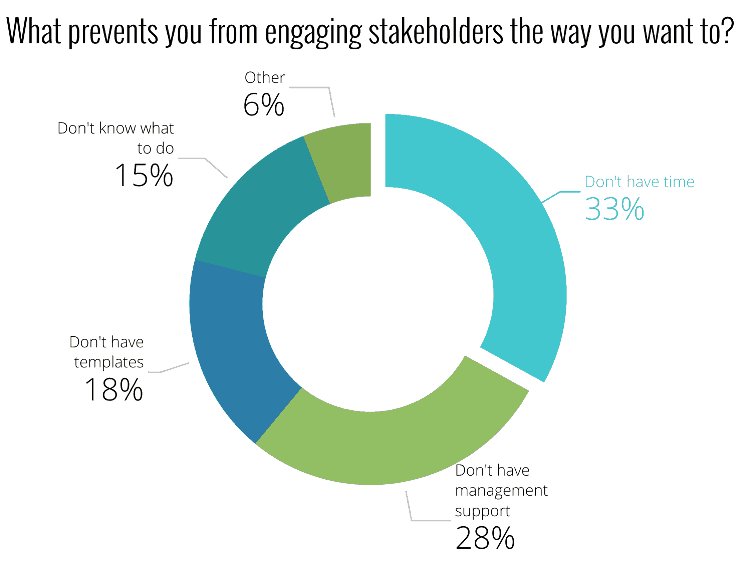
I recently ran a survey about stakeholder management (thanks, by the way, if you were one of the people who filled it out) and the results surprised me. While I haven’t got the full results yet, I have done a bit of analysis on them and I wanted to share what I know so far with you.
The biggest reason we do stakeholder engagement activities on projects is because they help us get the resources we need for the project.
Over 30% of people don’t do stakeholder engagement the way they want to because they don’t have the time or the time with their stakeholders. One in three people feel like they can’t manage their stakeholder relationships1 because they don’t know what to do or they don’t have the templates to help them.
Here’s how it breaks down.
I know what that’s like. I work as a project manager, I run my own business around the edges of that, and I have a young family. Time, and the energy to create documents from scratch when no one much seems to care are things I don’t have.
I have had my ups and downs with stakeholder engagement. For a start, when I began managing projects it was all about ‘managing’ stakeholders and it took me a long time to work that you can’t manage people into being supportive about your project. It just doesn’t work.
They have to want you to be successful, which is where the management support comes in.
Successful stakeholder engagement means understanding what people want out of the project, how they feel about it, how that changes over time. And it requires regular check ins and planning.
Over time I’ve developed ways for me to work with my stakeholders that doesn’t feel cheesy or forced and that works for me. One of the first things I do on any new project is create my plan of action for uncovering stakeholders and understanding their motivations.
After all, it’s people who get projects done (or stopped). Not processes or documents.
Having said that, processes and documents can really help! Especially if you are pressed for time or don’t know exactly where to start.
Ta Da! A Done For You Process & Set of Documents for Stakeholder Management
If you’re one of the 33% who don’t know what to do or don’t have the templates to do it, then I have a special announcement for you.
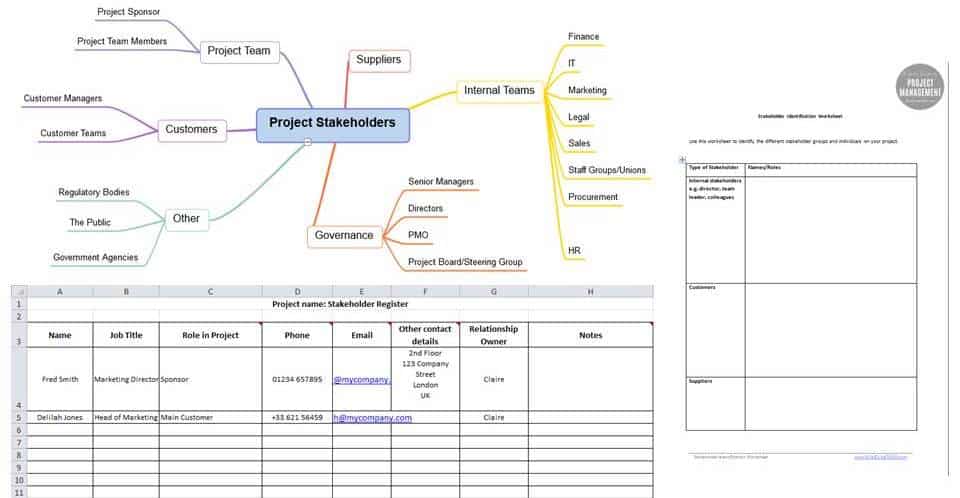
In my Stakeholder Engagement Template Pack I’m sharing my 4-step process for successfully engaging stakeholders, plus the templates to support you to actually do it.
Some of the templates in the pack
It’s a set of ready-to-use, fully customisable and editable templates, checklists and a couple of tip sheets as well. I go through the process (it’s 2.5 pages of big writing, so this isn’t going to bog you down – it’s all designed to be fast to understand and fast to use) and show you which templates to use when.
The template pack will help you:
- Identify who needs to be involved in your project.
- Work out how they are going to react to your project.
- Create an engagement plan to ensure that you can shift the behaviour or attitudes of any stakeholders who appear negative, and ensure that the team maintains the positive outlook of any stakeholders who are supportive.
- Look professional and prepared when working with stakeholders.
- Review how your engagement activities are going so you can switch out your strategies if you need to.
There are 10 documents plus the overarching Stakeholder Engagement Checklist which walks you through the whole process and shows you what to use when. It sounds a lot but they have all designed to be simple to use ‘out of the box’ (and you don’t have to use them all if you don’t think it’s appropriate on this project. Maybe you’ll need them next time!).
If you’ve ever felt like there has to be a better, faster way to plan your stakeholder engagement then you won’t want to miss this! It’s $18. Buy before 23 February and get a bonus cheat sheet of 15 tools for stakeholder engagement that AREN’T email and meeting face-to-face (because we all need some inspiration of what else to try, right?).
Oh, and if you purchase in error or change your mind, just get in touch and I’ll refund you, no questions asked. I know it’s hard to tell from small screenshots if it’s really for you so I want you to be confident that if you realise it isn’t right for you that you aren’t out of pocket. Here’s the link again: Stakeholder Engagement Template Pack.
Referred Link - http://www.girlsguidetopm.com/2017/02/15-clever-ways-to-save-time-at-work/

I can’t be doing with managing app alerts from Slack on my iPad, Facebook messages on my phone and desktop alerts for meeting appointments.
There are no shortcuts in project management really, but wouldn’t it be nice if we had a few ways to speed things up?
I’m delighted to be partnering with BrightWork today to bring you 15 of my favourite time-saving and productivity tips (and there are some free templates for you to grab – scroll down).
1. Call People Before Meetings
Give people a ring before a meeting. Ask them if they are still coming and if they have anything for the agenda. If there are any decisions to be made, talk to them about the options and informally canvass their opinion on what they think is the right way forward.
This takes a little time but saves eons of time in the actual meeting, because you’ll be able to use the information you have gathered to head off conflict and bring the group to a decision far more quickly.
2. Trust Your Processes
You don’t want to worry about how to handle changes when they get raised. So set up processes that are repeatable and that work.
The extra bonus benefit of having documented processes is that you can then hand the work off to someone else – they can follow the process steps just as well as you.
3. Use Templates
I never write a project document from scratch. There is always something I can start from.
But you can use templates for more than just project documents. Find templates for project plans, your project management software tools, reports and more: it all helps save time.
For example, it takes ages to customise SharePoint sites to make them work just the way you want to for project and portfolio management. Whether you are managing tasks as a project team member, or a set of projects in the Portfolio Office, you can save yourself a lot of time by using templates that extend SharePoint beyond what is offered out-of-the-box.
BrightWork has a set of free project management templates for SharePoint and Office 365 that will instantly make it easier to get your projects started, tracked and controlled through the life cycle.
4. Batch Your Work
Switching between tasks isn’t productive because it takes you time to wind down one task and get into another.
Batching tasks is where you work on multiple things that use the same tools or skills at a time. For example, in my copywriting job I produce a video for a client once a month. I tend to record three or four videos in a batch because it takes time to set up the camera and pack it all away again.
I do the same with emails: I’ll block out a morning or an evening to just blitz emails. You could do the same with any similar tasks. Block booking meetings is a good one.
5. Write Your Reports as You Go
This tip saves me thinking time.
I take last week’s (or last month’s) project report and save it with the name/date for the next report. Then I highlight all the text that needs changing or updating in yellow. During the reporting period I go into the document regularly – sometimes I have it open practically all the time – and add in things that need to be reported.
So if I add a new risk to the risk register that is significant enough to make the report, I put it on the report at the same time.
At the end of the reporting period there will still be some bits in yellow that need to be updated or removed, but the bulk of the updates will be done and I won’t be struggling to remember what significant things happened.
6. Consolidate Your Notifications
Consolidate all your notifications so you don’t have to go to multiple systems to find out what is going on
My inbox is where I spend a lot of time. All my important notifications go there so I only have one place to check. Consolidate them (or turn them off).
7. Turn off Popups
This helps you focus without being distracted. Turn off the pop up in Microsoft Outlook (or whatever you use) that tells you when you have a new mail.
The extra benefit of this is that you don’t then get those notifications ping on the screen when you are busy trying to show someone something on your computer. Trust me, they won’t be able to stop themselves from reading your alerts and messages.
8. Stand up for Phones Calls
Try it, it works! If I want to get someone off the phone, I stand up. Somehow it helps me finish the conversation more quickly.
Generally, calling people is often faster than emails or instant message if you can get through to them.
9. Unsubscribe
Reading all those emails eats up time in the day. Unsubscribe! Be ruthless.
Not from my newsletter, obviously 
10. Delegate
You will burn out trying to do it all. Delegate as much as you can to as many people as you can. Say no a lot.
There’s a long article here on how to delegate tasks if you are finding it difficult to let go.
11. Use Email Mailing Lists
I have standards lists of people to whom I write every week. There are lists for people who get this report or that one, lists of project team members, Steering Group members, wider stakeholders, people who get the project newsletter… and so it goes on.
I can’t hold all those names in my head and I know the implications of what would happen if I left someone off accidentally.
I have email mailing lists for all these scenarios. Some are created directly within Outlook so I can use a short name and call up the mailing list people. Some I have in Excel and then open the file and copy and paste the names – this is for a particular user group that changes almost every week. It’s easier to add and delete members in a spreadsheet than it is to use Outlook’s email list function.
Set up lists for your own project and save a few seconds here and there trying to remember and enter all the names.
12. Cut Meeting Times
Check your diary. Are all your meetings in for an hour?
An hour isn’t the ‘right’ length of time for a meeting. It’s just the length of time that calendar apps default to.
Software shouldn’t dictate how long your meetings are. Challenge yourself to set up your next meeting for 45 minutes and to stick to it. I promise you will be more focused and you’ll still get through your agenda in the time.
Plus you get 15 minutes of your day back. Win!
13. Pick Your Battles
Sometimes, being right is not as important as getting the job done.
Sometimes, it is worth the fight and you have to do it for the good of the team. Sometimes, just let it go and save your time and energy for a day when you have to step up.
If your sponsor is asking for something that is a bit outside your job role but that you could do easily enough, or your team wants to do a task in a different way to how you would do it: think about whether it’s a battle worth getting into.
If it isn’t (and it probably isn’t), move on.
14. Use Checklists
This is another tip that stops you relying on your memory and helps you systemise more of your tasks.
Use checklists: for meeting prep, packing luggage for overseas business trips, for finishing a project stage, for starting a project… for anything really.
If you do it routinely, a checklist can help you work through the steps more quickly and with less stress.
15. Take a Break
Finally – and I know this sounds counter intuitive in an article about getting things done faster – take a break. Have a lunch break. Go for a walk.
You’ll come back refreshed, with more energy and a clearer head to face the rest of the day. Even a short break away from the screen can help. Get a coffee, chat to a colleague and preferably get some fresh air if you can.
Referred Link - https://www.linkedin.com/pulse/six-positive-expressions-say-when-you-have-new-task-enrique-rubio


Learning how to thrive when we have new assignments, projects or tasks, or perhaps a new job, can become very daunting. This is especially true when the task we are about to embark on is challenging by nature and will require a lot of our energy.
However, research shows that most of us stay engaged and motivated when we constantly try new things at work, particularly the type of things that increasingly add more complexity to the job that we do. These tasks continually push our knowledge to the limits and beyond, propelling us to learn more, maybe becoming more effective, creative and innovative.
But how to really stay engaged and inspired when we are assigned a new challenging task? How can we ensure that we are taking the most out of it? How to maximize the opportunity for us to fully step up our professional level by successfully completing the new task?
I compiled this list of six expressions that are worth repeating to ourselves every time that we set out on a new challenging endeavor. They will help us stay focus, energized, inspired and, most importantly, confident in our current or potential abilities to successfully complete our duty:
1. “I can do it”
Most of the times, when we are assigned a new task in our workplaces, it’s because our leaders see the potential in us to do it, and do it well. “I can do it” is a positive self-reinforcement that we can potentially succeed in completing the assigned task. “I can do it” doesn’t necessarily mean that we currently have the know-how. Instead, it means that we will get it done by learning how to do it.
2. “I will learn how to do it”
Research shows that people tend to think and verbalize their current inability or lack of knowledge to engage in a specific task. This is especially true when people are about to apply for a job and they don’t have 100% of the skills for that job. In those cases, they think “I’m not good enough for this job” or “I don’t have the talents or the skills to do it” (this is particularly true for women, as shown in the research in “The Confidence Code”).
Well, we got to get all that BS out of our minds and change our mental negative story for a more positive one. Succeeding in new tasks has never been about knowing from the onset how to do it or solve the problems that will arise. Instead, it has always been about our capacity to learn quickly and move on. “I will learn how to do it” is just too powerful, because it brings up the positive energy that makes us think about what is possible, regardless of the current state of our knowledge.
3. “I will seek help”
Seeking help and support when engaging in a new challenging task is paramount for success. It’s very unfortunate that many people think that seeking help is synonym of less self-worth or, even worse, that that will send the message that “I’m not fit to accomplish the task”. On the contrary, seeking help is perhaps one of the most sublime ways to open the doors for collaboration, teamwork and new ideas that will eventually impact the realization of the task at hand. Never hesitate in seeking help.
4. “If I fail, I’ll get up, learn and move on”
Og Mandino said “just as any gem is polished by friction, I am certain to become more valuable through this day’s adversities”. Failing is not a mandatory preamble for success. However, I don’t really know anybody who hasn’t failed at least a tiny bit in the quest to achieve their dreams and goals. Engaging in a new challenging task is daunting, especially because of the fear of potential small or big failures. Rest assured that the road will always be bumpy.
However, we will increase our knowledge and value as long as we learn from the adversities and move on. We shouldn’t dwell in failures (neither in successes). Just learn as quickly as we can and apply our brand new knowledge in the next step to accomplish our task.
5. “I will get the most of out of this experience”
Sometimes we like the new challenging task, and some other times we hate it. It doesn’t really matter whether we love or hate the task in itself. What we have to do is think about how that specific experience will make us better, more valuable. We have to learn how to love the idea that any task in which we engage will always leave a legacy in us. And that legacy will make us better, because it will give us more tools and preparedness for whatever comes after.
I really think that as we progress in our professional life things continually get more complex. And it is because of our previous experiences that we are shaped to strongly face whatever comes next. Never miss or waste the opportunity to get your hands in a new task, because it will for sure make you better.
6. “If I succeed, I’ll be humble about it and use my knowledge for the next level”
Finally, when we successfully accomplish a complex task it is fundamental to celebrate our success. It is the medium for self-inspiration. Celebration is our pat in the back, but it should never come with arrogance. Accomplishing a task is not about winning a competition, but about winning the race against our previous self. Our new self knows more now and is well-prepared for what comes next. Let’s be humble about our successes, and yet celebrate them as an important life milestone. Then, let’s keep in our minds how the experience made us better and what to use for the next task.
Referred URL - https://www.linkedin.com/pulse/why-trust-essential-success-workplace-enrique-rubio


Imagine that you're assigned to a new project with a new team, but you know from the onset that there’s not enough trust among your team members. What do you think would be the overall impact of the lack of trust on the team's performance?
Perhaps, and most likely, the impact would be quite significant. Lack of trust will mess up with the potential for effective communication, collaboration, effectiveness, information and knowledge sharing, the quality of the decisions made and, ultimately, the successful accomplishment of the project at hand.
Such a scenario is not a made up case. It actually happens every day, among many teams in hundreds of organizations around the world.
Trust is essential for success in the workplace, as it is the oil that keeps the organizational machine lubricated, working smoothly and effectively. Trust is fundamental to ensure engagement, productivity and innovation.
Research says…
According to a report by the World Economic Forum, 58% of CEOs are concerned about how the lack of trust impacts their companies’ growth. In addition to that, a 2010 research by Deloitte showed that around 65% of Fortune 1000 executives think that trust is a relevant factor for voluntary employee turnover.
Trust is essential for success in the workplace, both at the individual level and at the company level. For example, when it comes to trust in the organizational leadership, research by Interaction Associates and the “Building Workplace Trust 2014/2015” report shows that 82% of the people think that trusting the boss is fundamental for effectiveness in their job. Unfortunately, more than half of the interviewees don’t trust their boss, and that number seems to be increasing year after year.
Trust is more important than ever to keep organizations relevant and sustainable, with engaged and inspired employees, and high levels of productivity and innovation. It is essential to increase the levels of trust both between leaders and people, and among colleagues.
These are some of the key ways to increase trust in the workplace:
Moving forward past the lack of trust
If you are in a position of leadership and aware of the lack of trust in your organization and the impact it has in performance, it is YOUR responsibility to begin the process and move forward past the lack of trust. Since you are admitting that there’s a problem (lack of trust) that needs to be solved, you need to begin changing the patterns that perpetuate the problem.
Below are some ideas. However, it’s useful to simply acknowledge in front of your team members that you see the problem and you are concerned about it and want to get everyone onboard to make things better. Then, you need to immediately go from talk to action.
Getting input and involving people before making decisions
One of the most critical ways to increase trust is by involving and engaging people before any important decision is made. I hope you are not one of those who think “this is my job, I get to make the decision” or “they don’t know about this topic”. That’s not going to get you too far in building trust among your colleagues, leaders or subordinates.
Going back to the example at the beginning, an important milestone in influencing a positive culture of trust would be to ask people to come together to solve problems, identify opportunities for the project, propose ideas, etc.
Usually, people are eager to get involved, but the lack of trust prevents them from participating more. They don’t want to tell their ideas to others who might not acknowledge them or give the proper credit later, or they don’t want to be shut up by their leaders. Begin by opening the communication channels and allowing people to participate.
Giving information to promote understanding
Eventually, there will come the time when a decision has to be made. After getting people’s input and analyzing all the available information and data, any decision will somehow validate some ideas and save others for later. It is fundamental to communicate with clarity and transparency why a decision is made. This promotes understanding and acceptance. Not necessarily total agreement, but at least the capacity to say “the decision was made taken into account all the input given”.
The problem in many organizations is not that people dislike a particular decision, but that they are not fully informed of why that is the decision made. Unfortunately, dislike for the process of making a decision gets confused with dislike for the authority making such decision, or the decision itself. And leadership then gets a wrong opinion on their people’s behavior as a consequence. Leaders could think “people are not engaged because they are not fully implementing the decision”. Well, perhaps the problem is about understanding and not about disagreement.
While it is true that people will disagree with some of the decisions an organization makes, having available information about the rationale behind such decisions can prove to be effective.
Creating an environment for success
Setting up your colleagues and teams for success is a basic component of trust. That means providing the tools, resources and opportunities that people need to succeed at the individual level. An organization’s success is equivalent to the success of every single individual. Therefore, ensuring that people have what they require to succeed is a hallmark in increasing trust.
Creating an environment for success doesn’t mean that people won’t fail. On the contrary, it means that they have the opportunity to learn from each experience without punishment.
Promoting safe space for risk-taking and honest mistakes/failures
If somebody doesn’t feel that risk-taking is allowed or they are afraid of being punished for making a mistake, they will never have the level of trust necessary to openly communicate whatever is happening with their work. Consequently, the impact could be catastrophic. Instead of communicating and learning from mistakes and failures, people will hide them in order to avoid punishment.
It is essential to let people know and feel that risk-taking is accepted (and necessary for effectiveness and innovation). At the same time, coach them when they make honest mistakes. The fear for failure has to be radically decreased in the work place in order to everyone to be open about what is really going in the everyday operation.
A questionnaire to subjectively assess the level of trust in your organization
These are some questions that will help you assess the levels of trust in your organization:
- How do people share their ideas in the workplace? Do they do it freely?
- What are the levels of collaboration? Does collaboration happen naturally and spontaneously or is it forced from the top leaders?
- What happens when somebody makes a mistake? Do they openly share what happened, the lessons learned and move on, or do they hide the situation in order to avoid punishment? Do people point fingers at others instead of taking responsibility?
- Is the rationale behind major decisions communicated to team members? Or are the decisions communicated without any explanation or “why” behind them?
- Do people have the tools necessary to successfully perform their work and succeed at their task? Are they open about what they need in order to succeed?
- Do people like to voluntarily participate in new projects?


 Posts
Posts


